





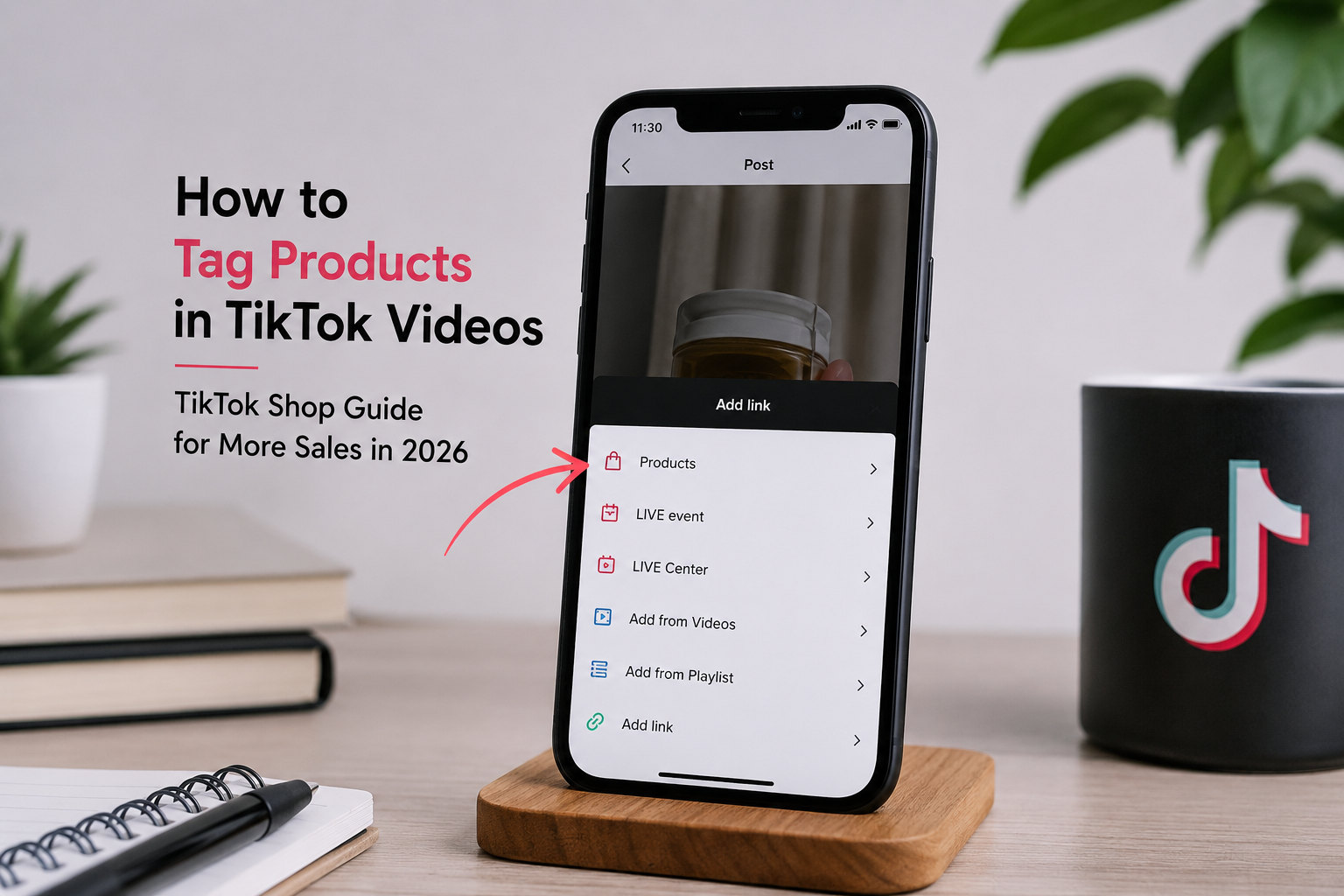
How to Tag Products in TikTok Videos (TikTok Shop Guide for More Sales in 2026)
TikTok has transformed from an entertainment platform into one of the world's fastest-growing social commerce marketplaces. With millions of users discovering products daily, learning how to tag products in TikTok videos is no longer optional—it's essential for brands, creators, and TikTok Shop sellers.
When products are tagged correctly, viewers can purchase without leaving the app, creating a seamless shopping experience that significantly improves conversion rates.
In this guide, you'll learn exactly how to tag products in TikTok videos, the requirements, common mistakes to avoid, and proven strategies to increase TikTok Shop sales in 2026.
What Is Product Tagging on TikTok Shop?
Product tagging allows TikTok Shop sellers and approved creators to attach products directly to videos.
When viewers watch your content, they'll see a clickable product link that opens the product page instantly. Instead of searching manually, customers can buy in just a few taps.
This frictionless shopping experience has become one of the biggest reasons why TikTok Shop continues to generate billions in eCommerce sales.
Benefits of Tagging Products in TikTok Videos
Using product tags offers several advantages:
- Makes videos instantly shoppable
- Increases click-through rates
- Improves conversion rates
- Boosts TikTok Shop algorithm visibility
- Helps products appear in shopping feeds
- Builds customer trust with direct product links
- Encourages impulse purchases
- Simplifies the buying journey
Businesses that consistently create shoppable content often experience higher engagement than brands relying only on standard promotional videos.
Requirements Before You Can Tag Products
Before tagging products, make sure you meet these requirements:
1. Have a TikTok Shop Account
Your business must be registered with TikTok Shop in your supported region.
2. Products Must Be Approved
Only products that have successfully passed TikTok Shop review can be tagged.
3. Link Your TikTok Account
Your TikTok account should be connected to your TikTok Shop Seller Center.
4. Follow TikTok Shop Policies
Products that violate marketplace guidelines cannot be tagged.
5. Use the Latest TikTok App
Always update the TikTok app to access the newest shopping features.
How to Tag Products in TikTok Videos
Follow these simple steps.
Step 1: Open TikTok
Create your video or upload an existing one.
Step 2: Tap Next
After editing your video, proceed to the posting screen.
Step 3: Select "Add Link"
You'll see several options before publishing.
Tap:
Add Link
Step 4: Choose Products
Select:
Products
TikTok will display products available from your connected TikTok Shop.
Step 5: Select the Product
Choose one or multiple products relevant to your video.
Only tag products actually featured in the content.
Step 6: Publish Your Video
Finish writing your caption, hashtags, and thumbnail.
Tap Post.
Your video is now shoppable.
Best Practices for Product Tagging
Simply tagging products isn't enough.
Successful TikTok Shop sellers follow these best practices.
Show the Product Early
Capture attention within the first three seconds.
Users decide quickly whether they'll continue watching.
Demonstrate Real Usage
Instead of static product shots, show:
- Before and after
- Daily use
- Problem-solving
- Unboxing
- Tutorials
- Product testing
People buy products they can imagine themselves using.
Keep Videos Short
Top-performing TikTok Shop videos usually range between:
15–45 seconds
Short videos often achieve higher completion rates.
Match the Product to the Content
Never tag unrelated products.
Doing so can reduce customer trust and hurt video performance.
Use Strong Calls-to-Action
Examples include:
- Shop now
- Tap below
- Check today's price
- Limited stock
- Get yours today
- Don't miss this deal
Encourage viewers to take action.
Common Mistakes to Avoid
Many sellers accidentally reduce sales by making simple errors.
Avoid these mistakes:
- Tagging unrelated products
- Overloading videos with too many product tags
- Using misleading thumbnails
- Creating overly promotional content
- Ignoring comments
- Posting inconsistent content
- Forgetting captions and keywords
- Using copyrighted audio without permission
TikTok SEO Tips for Product Videos
TikTok now functions as a search engine.
Optimize your videos with searchable keywords.
Include keywords naturally in:
- Video captions
- Spoken dialogue
- On-screen text
- Hashtags
- Product titles
- Product descriptions
Example keywords:
- TikTok Shop finds
- Kitchen gadgets
- Home organization
- Beauty products
- Amazon alternatives
- Gift ideas
- Viral products
- Summer essentials
Keyword optimization helps videos appear in TikTok search results.
How Often Should You Post?
Consistency matters more than perfection.
A recommended posting schedule is:
- 1–3 videos daily
- 5–7 days per week
- Mix educational and promotional content
- Test different formats
Regular posting provides more opportunities for TikTok's algorithm to distribute your content.
Analytics to Track
Monitor these metrics inside TikTok Shop and TikTok Analytics:
- Product clicks
- Video views
- Watch time
- Click-through rate (CTR)
- Conversion rate
- Add-to-cart rate
- Revenue
- Average order value
- Engagement rate
- Return on Ad Spend (ROAS)
Reviewing these metrics helps identify which content drives the most sales.
Advanced Tips to Increase TikTok Shop Sales in 2026
Partner with Creators
User-generated content (UGC) often outperforms traditional ads because it feels more authentic.
Go Live Regularly
TikTok LIVE Shopping allows viewers to purchase products while watching your live stream.
Follow Trends
Use trending sounds, challenges, and formats when they fit your brand.
Timely participation can improve discoverability.
Respond to Comments
Answering questions builds trust and can encourage more purchases.
Test Different Hooks
Experiment with openings such as:
- "I wish I bought this sooner…"
- "This changed my daily routine…"
- "TikTok made me buy this…"
- "Here's why everyone is talking about this…"
Strong hooks improve watch time and engagement.
Frequently Asked Questions
Can I tag multiple products in one TikTok video?
Yes. TikTok allows eligible sellers to tag multiple products when they're relevant to the video.
Why can't I tag products on TikTok?
Common reasons include:
- Your TikTok Shop isn't connected.
- The product hasn't been approved.
- Your account isn't eligible.
- You're using an outdated app version.
- Your region doesn't support TikTok Shop features.
Does tagging products increase sales?
Yes. Product tags reduce friction in the buying process by allowing customers to purchase directly from your video, which can improve conversions when paired with engaging content.
Can creators tag products without owning a TikTok Shop?
In many regions, approved affiliate creators can tag eligible products through TikTok Shop Affiliate programs, depending on local availability and account eligibility.
Final Thoughts
Learning how to tag products in TikTok videos is one of the easiest ways to turn engaging content into sales. As TikTok Shop continues to grow in 2026, businesses that create authentic, informative, and entertaining shoppable videos will be better positioned to attract customers.
Focus on creating value first, tag products that genuinely match your content, optimize videos with relevant keywords, and consistently review your analytics. Over time, these practices can help improve visibility, engagement, and conversions on TikTok Shop.
Explore More TikTok Shop Resources
Looking to grow your TikTok Shop even faster? Check out our other expert guides on TikTok marketing, product optimization, and eCommerce strategies to keep improving your sales.
Whether you're launching a new TikTok Shop, optimizing product listings, or scaling your sales, our team is here to help. Visit our website to learn more about our services or get in touch for a personalized strategy.
Work with ApexBin
Getting views but not conversions?
Muhammad Mustafa has over three years in marketplace advertising and operations, working with sellers across the US, UK and UAE.
TikTok Shop Listing Optimization →





Blog Comments (0)
No comments yet. Be the first to comment!